Friday, April 29, 2016

Here's How to Kick Your Web Host to the Curb and Never Miss a Beat

Posted by sherisaid

In nearly every business website owner's life, the time comes when you have to switch servers. Most of us start small with what we can afford, assuming we can scale up as we grow. At some point, we outgrow the web host and wind up with slow, limited service and an outdated back office - or worse - an update that doesn't support your processes and makes a mess of everything.

Before I became a writer, I worked for many years at a small web hosting company. Part of my job (which had a lot of parts; you know how it is) was helping customers move on and off our proprietary software. It consisted of a semi-custom website loaded with features for member organizations.

Back in the dark ages (2006-ish), migration was a great deal more complex - making their data fit our fields for import sometimes required manually rewriting all the code. Without the tools and platforms we now have, it often took months to get customer data reformatted for migration to a new host. What a nightmare!

Things are a lot different today, but in some ways, the complexity of platforms and devices makes migration potentially more confusing. A decade ago, we were still in the early stages of smartphones, and all mobile sites were redirects to uncomplicated m. sites. Tablets didn't even exist. We didn't have to worry about mobile optimization and compatibility issues like we do now for a huge variety of devices, sizes, and operating systems.

If you're worried about the possibility of having to move your site, you should be. Issues caused by a move can cause slow load times and affect SEO, disrupt business operations, and undermine consumer confidence. The bigger the site, the greater the risk you are taking that the move will impact your search engine rankings.

In a blog post, the research director at Gartner, Gregor Petri wrote, “It is often difficult (lengthy and expensive) for user organizations to switch suppliers, often because after some time the software becomes so closely linked with the way the organization works that saying goodbye to the vendor becomes virtually impossible.”

How to avoid cloud lock-in

Vendors can hold your website hostage in several ways, and avoidance is your best defense. You really don't want to find out when it's time to move that you don't own your own data, graphics, architecture, or proprietary functions (such as code you paid to have written).

cdC0wlh.jpg?1

My first piece of advice is pretty simple and applies to everything you put your signature on, ever: Read the fine print before you sign.

Choose a cloud vendor that uses open source code to make it easier to migrate, if you must.

But, of course, you already have a website.

It's big, it's gnarly, and it's jam-packed with multimedia content, cool interactive features, and a nested navigation system that would make M. C. Escher weep.

Crafting an exit strategy

Before you need to move, be ready. Here are five things you can do to always be prepared for the worst. I'm just going to assume you already have your contract in hand and are checking the details.

Uy44Xh3.jpg?1

Step #1: Always have up-to-date backups

It doesn't happen often, but hosting companies do go out of business. Don't panic. Most web hosts make regular backups, so in the unlikely event yours goes down in flames, you can be back online in no time. The first point in your exit strategy is having an up-to-date backup ready.

Step #2: Research migration tools

Finding the right migration tool is often a matter of doing your homework. Picking the right tools - or set of tools - will ensure a seamless transition.

Step #3: Pick a new destination

If you suddenly lose your web host, scrambling to find a new one can lead to mistakes. Make a short list of potential vendors that are a good match for your business in terms of the costs, the software, the compatibility, and other pertinent details.

Step #4: Get your SEO in order

While you should keep your SEO on-point in general, if you're considering moving to a new server, you need to make darn sure it's clean.

Starting with a well-optimized site will make any transition much easier.

Step #5: Evaluate your features

You may be relying heavily on integrated software and custom programming. Talk to your programmer in advance about whether all the bits and bobs that make your website functional will plug-and-play on a new system.

In most cases, you'll have plenty of time to prepare to move to a new server without making a mess of your SEO. You'll be able to create a sandbox where you can test all your features and verify your data and architecture before going live.

Besides, if you're like most businesses, you website is already on a new, updated server, right? If not, you really need an exit plan. If you published a set-it-and-forget website years ago, you are likely missing out on a lot of conversions.

Ideally, you want to be able to switch servers without missing a beat, even if a hurricane takes out your hosting facility or you suddenly hit a bandwidth wall. It's always a good idea to have a plan B.


Sign up for The Moz Top 10, a semimonthly mailer updating you on the top ten hottest pieces of SEO news, tips, and rad links uncovered by the Moz team. Think of it as your exclusive digest of stuff you don't have time to hunt down but want to read!

Stop Neglecting Analytics in Your Customer Engagement Strategy

Customers desire experiences, not transactions.


In a world full of distractions, engaging customers beyond the typical purchasing routine is vital for SaaS success.


And B2B consumers crave unparalleled engagement. They want personalized advice, solution-oriented features, and revenue-generating products.


An IBM annual survey noted that “as many as 65% believe customer engagement will be the primary driver of growth going forward.”


Analytics is one of the few ways to gain insights to meet your customers' needs. It helps bridge the gap between providing a service to solving real challenges.


Enhance the experience between your brand and consumers. Build data into your customer engagement strategy.


It Starts With Value


Studies show that “86% of buyers will pay more for a better customer experience, but only 1% of customers feel that vendors consistently meet their expectations.” That's a major disconnect for SaaS companies striving to improve customer engagement.


B2B customers aren't concerned about aesthetic features. And they aren't amped to hear how your team worked around the clock to fix a bug.


Your consumers want a service dedicated to solving their problems in an efficient manner.


Natalie Chan, an expert handling customer retention at Outbrain Amplify, writes:


“Businesses that focus on customers engagement are focused on value creation, not revenue extraction. These are businesses that know how to engage their customers by providing them with real value whether it be through an exceptional end-to-end customer experience, great content or strong customer support that are about delivering more than the traditional sell.”


Offering value means addressing your customers' desires. And it's all about how they perceive what's important.


For example, if a prospect is concerned about increasing open rates in email campaigns, it's not in their best interest to discuss layout designs.


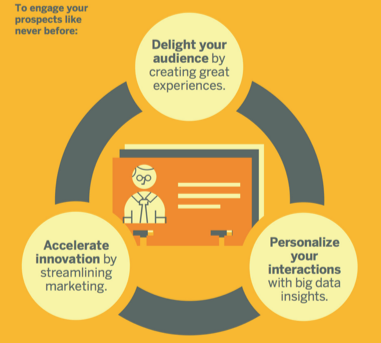
engage-prospects


Image Source


Value requires laser-focus. And that's where analytics steps in.


Monitor usage data to assess the customer experience. Track acquisition channels to observe where customers are coming from and if they're converting.


Interview customers and ask them why they chose your product. Figure out how they expect to use your product and what business goals they want to achieve.


Create and deliver unprecedented value. Connect with the customer.


Know Your Buyer


In order for customer engagement to work effectively, your team must know your buyer. And that goes beyond the usual demographics, like annual revenue, company size, and location.


More importantly, for B2B companies, your team must not only focus on the business itself, but also on the employee of the business. Learning about the decision maker is crucial to your sales.


Leveraging big data to better understand and act upon customer behavior, forces you to think differently not only about what data to keep (all of it!) and how long to keep it, but also which data you should begin capturing,” states Duane Edwards, Co-founder and Senior Vice President of Globys.


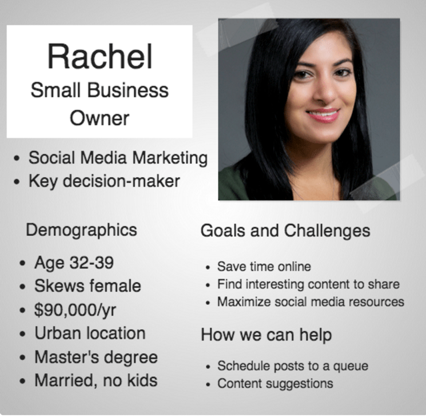
Analyze your primary behavioral data to create in-depth customer personas. Understand the decision maker's goals and challenges. Also, know how you can provide short-term and long-term guidance.


buyer-persona


Image Source


Bruce Swann, Sales and Marketing professional at Adobe, suggests applying predictive analytics:


“Once you've compiled data attributes to create a panoramic view of customers, you can begin to understand and predict customer behavior, which adds depth to that view. Examples include using a range of analyses, including customer value analysis, market basket analysis, customer profitability, response modeling, and churn analysis.”


Use data as an indicator of future behavior. If you know your client's customers, it may lead to helping your client differently.


For example, NoWait is an app that simplifies the process of waiting for a table at a restaurant. Instead of having a guest tote around a clunky pager with a range of 50 feet, restaurants only need the person's cell phone number.


When the table is ready, the guest receives a text. Plus, after dining, restaurants can text customers additional discount offerings.


Moreover, with the app, restaurants learn “who their patrons are, what time they come and go, which patrons come back the most frequently, who purchases more.” This data can be used to create messaging that appeals specifically to each customer.


Know your buyer and your buyer's customers.


Content That Resonates


Content is more than just blog posts. It includes everything from checklists to webinars.


Research shows that “64% of visitors who watch a video are more likely to buy a product online.” Therefore, content isn't just helpful for your brand awareness; it's a vital part of your customer engagement strategy, which leads to sales.


Examine heat map data to improve your content. It will help you learn what content is important to the consumer. Then, your team can focus on content placement and how different images and colors in your content affect your website visitors.


Pete Mehr, Principal at ZS Associates, says, “By quantifying which content the customer engages, and how frequently, it becomes straightforward to continue to provide content back to the customer. This continuing content consists of an ongoing series of messages to a customer.”


Moreover, analytics will uncover which type of content matters to your customer. Is it eBooks? Or maybe 30-second video clips?


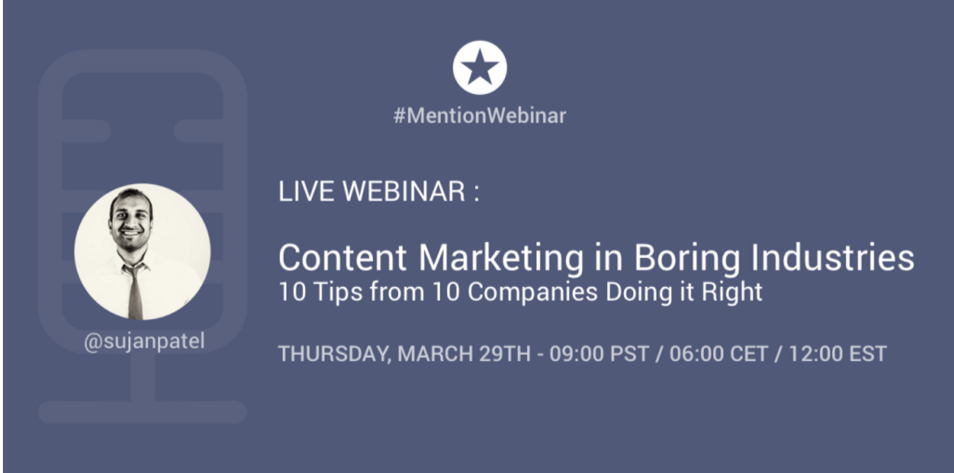
Mention understands their audience. They produce content that resonates.


The social monitoring company creates webinars highlighting experts in the field. For instance, Mention invited Sujan Patel (who is hosting a webinar with Kissmetrics next week) to talk about ways to create content for “boring” industries.


sujan-patel-webinar-ad


Study your data to find content that speaks to your customer. It's an effective way to boost engagement.


Multi-Channel Customer Service


In America, “the cost of poor customer service is $41 billion per year.” That's a heavy burden for most companies.


Moreover, a report found that “retailers are not listening and responding to their audience enough. Some 89% of consumers' comments are left unanswered.”


Approach customer service differently. Think beyond phone support and Q&A forums.


Social media has presented another solution. Now, SaaS businesses can provide Twitter and Facebook support.


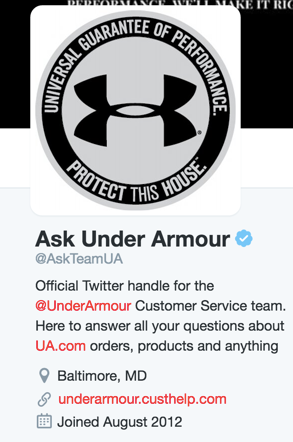
Under Armour created a Twitter handle solely for the purpose of answering customers questions about their products.


ask-under-armour-twitter


From your analytics reports, determine what channels of support satisfies your customers. What works for your competitor may not work for your SaaS.


“It's not about deploying on all channels, but deploying the right channels that align with your business. Only deploy on the channels that make sense for your business,” says Kate Leggett, a principal analyst at Forrester Research.


In addition, you must streamline your processes when using multiple channels. For instance, phone support data for a specific customer must also be available to your Twitter service reps.


At ComputerWeekly.com, Lisa Kelly suggests that “organisations need an accurate knowledge base where companies can link information from other channels, including peer-to-peer interactions, web self-service and communities, to share with customer service agents.”


It's not enough to offer various customer service routes. Your team must work together to use data to enhance the overall customer experience on each channel.


Respect The Data


Customer engagement isn't anything new. However, your SaaS can approach it differently with the help of analytics.


Add unmatched value to the customer's experience. Use data to gain insight on your buyer's habits and preferences. And provide customer service from a multi-channel perspective.


Stop neglecting, and start respecting your data.


About the Author: Shayla Price lives at the intersection of digital marketing, technology and social responsibility. Connect with her on Twitter @shaylaprice.


SearchCap: Bing Ads updates, latest Windows 10 release & the Jelly relaunch

Below is what happened in search today, as reported on Search Engine Land and from other places across the web.

The post SearchCap: Bing Ads updates, latest Windows 10 release & the Jelly relaunch appeared first on Search Engine Land.


Please visit Search Engine Land for the full article.


Thursday, April 28, 2016

Why Your Sales and Marketing Stack Needs a Solid Foundation

Imagine the best pancakes you've ever had. What made them work? They likely started with a solid recipe of core ingredients, then added just the right blend of proprietary variations to make an unforgettable short stack. But it all started from a solid foundation – flour, eggs, whole milk, baking powder, salt, cooking fat, and sugar.


Your marketing and sales stack is no different. The foundation will make it or break it. Luckily, the ingredient list isn't nearly as long as the pancake mix.


What are the core ingredients that make up a solid sales and marketing foundation? It starts with a strategy focused on the customer and your content, and the right tool to whip it all together.


Constructing the Stack


The right recipe will help ensure you deliver the right message to the right person at the right point. An effective sales and marketing strategy starts with the customer and content at its core, and is further refined by understanding the journey that customer makes. Glossing over this part often results in half-baked strategies that fall flat.


It's critical to understand what the buyer's journey looks like – the stages of awareness, consideration and decision, and the transitions in between. Each phase or stage will be specific to your buyer, which means getting to know your buyer is imperative.


Enter: The buyer persona. These are detailed accounts of your target customer. They go well beyond basic demographics like age, gender, and occupation. A good buyer persona will detail what their motives and priorities are, how they determine success, what their perceived or actual barriers are, where they search for solutions, and who impacts their decisions.


While surveys and reviewing analytics from online behaviors can provide some level of insights, one-to-one interviews are the best way to gather in depth details. You can conduct phone interviews or in-person visits with existing customers, or use industry events and trade shows as opportunities to talk to prospects, current customers and even the customers of your competitors. You're looking for answers to questions such as:


  • What priorities/problems prompted them to search for a solution?

  • Why did they choose your brand over another? Or why didn't they?

  • How do they determine success and what are their goals?

  • What barriers (perceived or actual) might stand in the way of their decision?

  • Where do they look for solutions?

  • Who influences their decisions?


buyer-personas


In depth buyer insights are the bedrock of customer success-focused content.


With this level of detail, you are better equipped to understand and interpret their actions, and the questions they might ask within each stage on their path to purchase. At this point, the recipe will start to come together as you determine how to align your sales and marketing strategies to harmonize with the buyer's journey and be there with the relevant content they need to answer their questions or solve their problems.


Understanding the framework – the customer, their journey and the desired outcome of the content you produce – you will be able to identify what parts of the recipe can be changed as goals change or you learn more about buyer preferences. These three ingredients – the customer, their journey, and the content – will be staples, but how that content is delivered or the type being created can be substituted.


In-depth buyer personas and a map of the customer journey is almost like cheating the system. Marketing and sales teams armed with these are better equipped to make a calculated, winning recipe – serving up the right stack (authentic content), at just the right time and in the right place.


Serving Up the Stack


Now that you've got a solid foundational recipe in place, there's one final element – a solid platform to serve it from. Today, there's a near endless supply of sales and marketing tools to support with everything from automation to customer relationship management and sales enablement, but even the best stack of tools can become unstable without the right foundational platform.


Marketing-Tech-Stack


Just some of the tools that can be added to the marketing and sales tech stack. Without the right foundation, this stack can quickly become unstable.


How do you identify the right platform from which to build the recipe? First and foremost, it should support you in building a solid foundation. In other words, it should enable visibility into your customers, the purchase journey they go through, and the delivery of your content at the right place and time. Internal portals, analytics and collaboration amongst the various players on your team is also essential.


customer-insights


(Image Source) How much do you know about your customer? What they're reading, where they're reading it, what social channels they use, and what they do?


Try to avoid a cobbled together “Frankenstack” of sales and marketing tools. This creates silos within your team and makes for an unstable strategy that lacks cohesion. Instead look for a primary platform to serve as the hub. It should play nice with a variety of tools – everything should work in concert. Before you commit to a platform, consider the following:


  • What is our desired outcome?

  • Will this platform support our goals?

  • Does this platform integrate with the apps we need for our team to work seamlessly?

  • Does this platform help us fulfill the goals of our customer, and ultimately ensure they continue to move through the funnel?


If you are working with an indirect sales channel, that platform should also support them with the training, marketing and sales tools they need to do their job and nurture their customers.


Conclusion


Before you start throwing together sales and marketing recipes, be sure to understand the role of each of those core ingredients and how they can be used to direct all recipes that follow. This will enable you to create far more effective strategies rather than hoping something will work.


The customer and customer journey, and content that originates from those two ingredients, produces a winning recipe and helps ensure your efforts won't be lost in a sea of marketing messages.


About the Author: Jen Spencer is the Director of Sales and Marketing for Allbound, an innovative SaaS platform that helps companies empower their resellers and distributors to be more customer-focused through content and collaboration. Jen loves animals, technology, the arts, and really good Scotch. You can follow her on Twitter @jenspencer.


Microsoft blocks Google Chrome & other browsers from Cortana in latest Windows 10 release

Microsoft says blocking third-party browsers & search providers improves user experience and is in keeping with how competitors act with their own digital assistants.

The post Microsoft blocks Google Chrome & other browsers from Cortana in latest Windows 10 release appeared first on...


Please visit Search Engine Land for the full article.


Wednesday, April 27, 2016

10 Must-Know Facebook Ads Tips & Features

It's no secret that paid social is drastically on the rise. Social advertising spend jumped 50% year-over-year in the last quarter of 2015. Social media ad revenue is expected to reach $35.90 billion by 2017, reaching a staggering 16% of the total global digital ad market.


Facebook (including Instagram) unsurprisingly comprises a big piece of this pie, making up an estimated 65.5% of all 2015 social ad spend. This is driven by changes in their CPC model, launch of Instagram ads & the addition of powerful new features.


This post will arm you with 10 important tips & features to ensure you're getting the most out of this channel.


1. Facebook Lead Ads


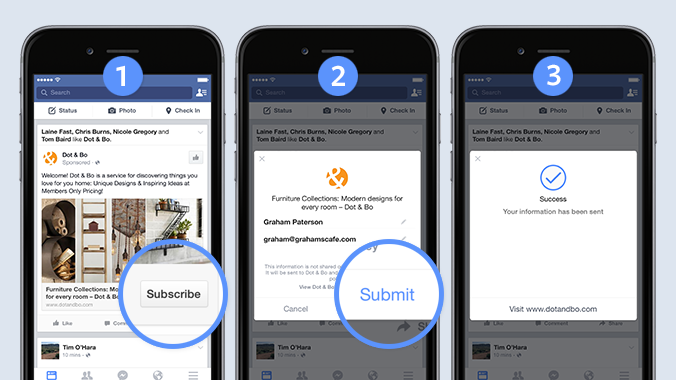
One of the most recent campaign types added by Facebook are Lead Ads. This campaign type allows advertisers to collect lead data without a landing page and directly through a form without leaving Facebook.


Some early advertisers found Lead Ads to result in a 4x reduction to their CPL (according to Facebook).


lead-ad-example-facebook


Example experience on mobile


To get started with Lead Ads, simply:


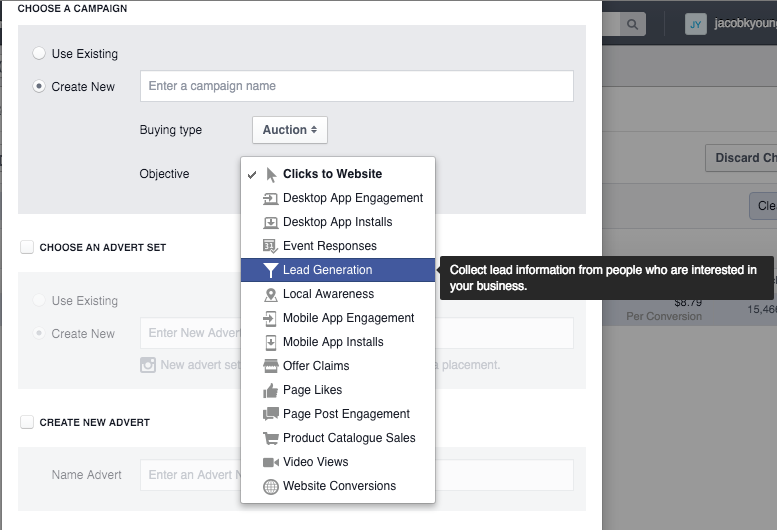
1. Create a new campaign with the “Lead Generation” objective


lead-gen-objective-facebook-ads


2. Build out your campaign/advert set, as you would for any campaign


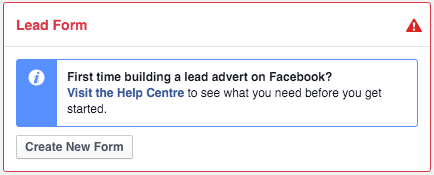
3. Create your lead form at the advert level


lead-form-facebook


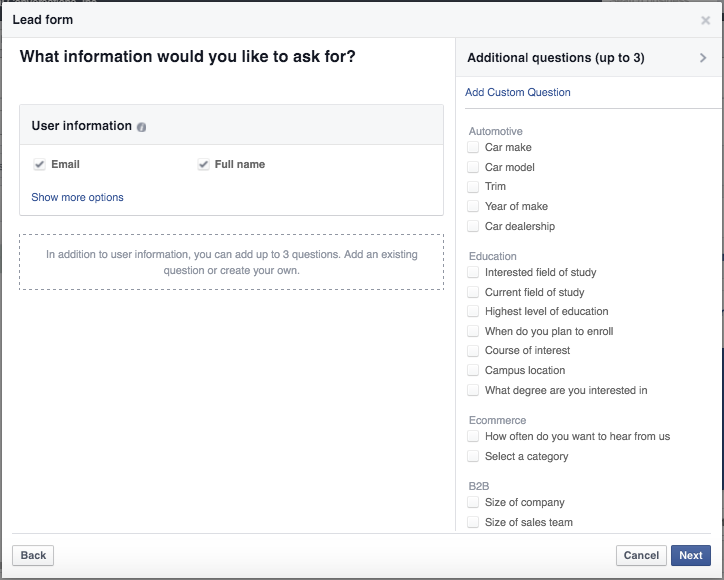
4. Choose the questions you'd like added and optionally add up to three custom questions


facebook-lead-gen-questions


5. Link to your privacy policy, add your disclaimer and destination URL


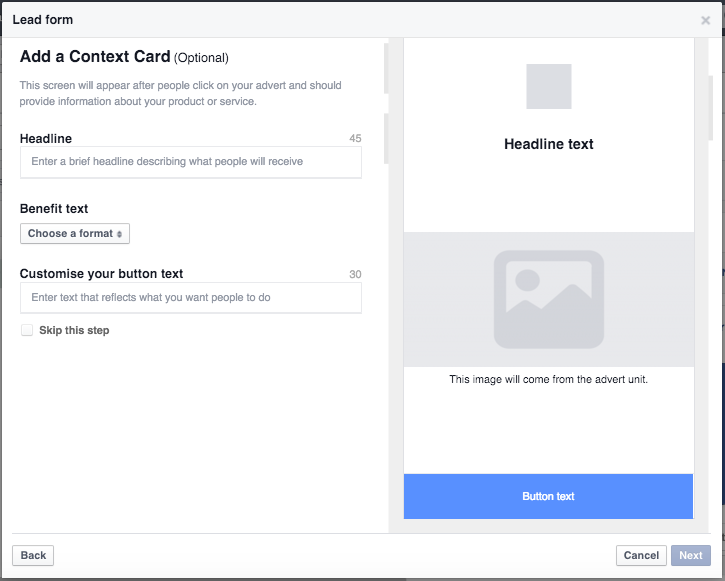
6. Customize your form


facebook-add-a-context-card


7. Preview then create your form


Now you're ready to get started with Facebook's newest and most powerful lead generation tool.


Tip: Twitter has had this campaign type for years, they call it Twitter Lead Cards.


2. Reporting, Reporting, Reporting


Some of the biggest wins are always found within the reporting section. One of the most important parts of reporting is the 'Breakdown' section.


  • Are your mobile placements converting?

  • What age group has the strongest CPA?

  • What regions aren't converting?

  • What gender is responding to your adverts?


These are all important questions that can be answered under the 'Breakdown' drop-down.


facebook-ad-campaign-dropdown


In this example, the Instagram placement converted a near 500% better than mobile news feed placement, at a fraction of the CPA. Knowing this, we'd shift more spend to Instagram and remove budget from the mobile news feed placement to maximize performance at our budget (if there's volume available).


3. Attribution models


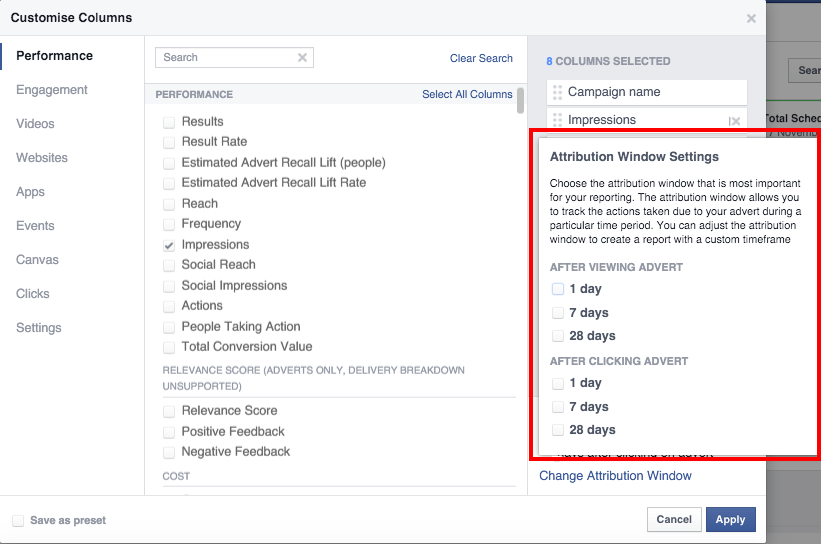
It's important to understand Facebook's attribution models, where to change the view and what makes sense for your conversion goal. These are the 'rules' for how each conversion is counted, in regards to the timeframe after an interaction with your advert and the method of the interaction (click or view).


This is important to take note of so you have a clear understanding of the value of your conversions and how they compare to the other networks you may be running.


Within 'Manage adverts', the option to change the attribution model can be found under 'Columns' > 'Customize Columns…' > 'Change Attribution Window'.


attribution-window-settings-facebook


4. Test Instagram


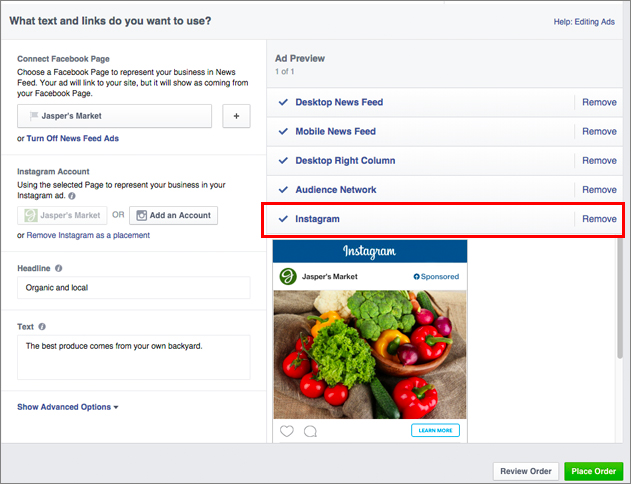
Since September 2015, Instagram placements have been made public in 30+ countries within the Facebook Ads Dashboard. Getting started with this is as simple as connecting an Instagram account and choosing the Instagram placement.


Break out some test budget and see how this placement compares.


facebook-ad-setup-instagram


Tip: Here are some helpful best practices when running Instagram Ads


5. Lookalike audiences


I've found lookalike audiences to be one of the most effective targeting methods on paid social.


A lookalike audience is a targeting criteria where Facebook generates an audience of user who are similar to your current customers or audience.


This audience can be based off an email list, segments of your Facebook Pixel or any conversion goals you have set up. Facebook matches these users with Facebook profiles then finds similarities in demographics, interests, behaviors, etc. Lastly, Facebook uses these finding to generate a list of similar Facebook users which you can target in your campaigns.


Learn how to create a lookalike audience here.


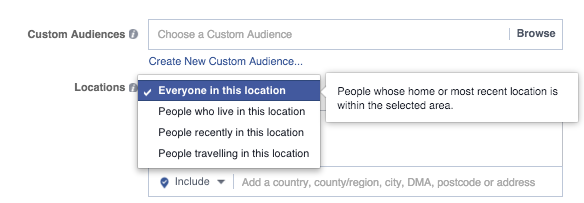
6. Keep an eye on Facebook's location options


An often overlooked targeting criteria is Facebook's more granular location targeting options. It's important to keep this in mind while creating your campaigns and use the targeting option that makes the most sense for your business.


locations-facebook-ads


Are you trying to target people living in a specific city, or all people within this city? These are two very different targets.


Take for example, a local service business operating only in downtown SF. You wouldn't want to be targeting people visiting for the weekend, or commuting in for work.


7. Speak to your audience


With Facebook's granular targeting methods, in most cases you know who you're speaking to (at least the interest, behaviours, etc. that define your audience).


Use this knowledge to tie copy and creative closely with each specific audience you're targeting.


Targeting a recent homebuyer? How about something like “Your new home would be complete with [Brand Name's] contemporary/ modern furniture line”.


8. Remarketing


All digital marketers know the importance of remarketing, so don't level this out of your Facebook Ads strategy be left out.


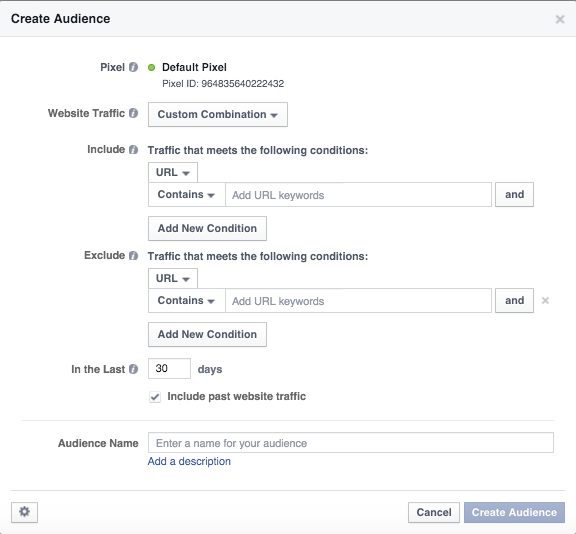
Make sure to take advantage of Facebook's audience segmentation options, where you can include/exclude specific pages & domains, as well as choose the remarketing window length.


create-audience-facebook


Tip: Did you know Facebook now offers Dynamic Remarketing?


This feature allows advertisers to remarket specific products to users who've previously viewed or added them to their cart. The creative and copy of your ads will dynamically change based on what products your visitors have viewed.


9. Test multiple creative and copy


Always test many creative and copy variants to see which ones resonate best with your audience. Facebook will optimize ad serving based on performance and your conversion goal.


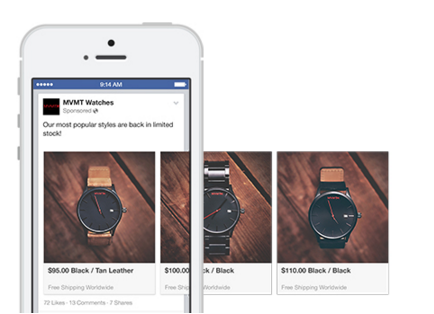
An interesting and relatively new creative type I recommend testing is the 'Carousel', which allows you to fit multiple images and links into a single creative.


facebook-carousel-ad-mobile


This creative type has been found to reduce your CPA by about 30-50% & decrease your CPC by 20-30% (according to Facebook).


Use this creative type to:


  • Showcase multiple products

  • Highlight multiple features

  • Create a larger canvas

  • Outline benefits

  • Tell your brand's story


Tip: Don't forget to run a statistical significance test to see if the improvement you're seeing is indeed valid and not just by chance.


10. Breakout campaigns by placement


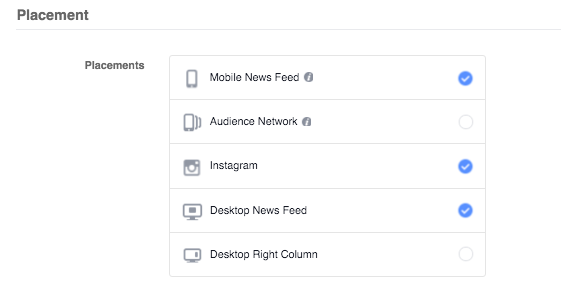
The different placements offered by Facebook perform very differently. It's important to keep an eye on their performance and where your spend is being directed (details of how to do this are found in #2 above).


facebook-ad-placement


When optimizing for clicks, I find most of your budget will get pushed to mobile or audience network (since these have the most effective CPC), however these placements may typically not have the best overall performance.


In most cases, I find it makes sense to break out your campaigns by placement (or at least mobile vs. desktop). This is especially true if you're setting manual bids, or if your campaign is set to optimize for clicks.


Conclusion


I hope you find these Facebook Advertising tips & features useful. If you have any questions or additional tips/features that you think merit discussion, let us know if the comments section, or email me at jacob@cleverzebo.com.


About the Author: This guest post is written by Jacob Young, world-traveling digital nomad and Senior Manager, Ad Operations at Clever Zebo. Currently writing from the Co-Work office in Sayulita, Mexico. To learn how Clever Zebo can jumpstart your paid social efforts, shoot us a note at igor@cleverzebo.com or Tweet us at @CleverZebo.