Friday, July 29, 2016

Customer Data: The Solution to Lead Generation

More leads, please.


In most companies, it's an ongoing process to generate interested buyers to your product and services.


We want qualified leads that move effortlessly throughout the sales cycle.


But the problem lies in our preparation. Some of us just don't have enough information about our prospects.


The CSO Insight study reported that “42 percent of sales reps feel that they don't have the right information before making a call.”


Use accurate customer data to prepare your team. Knowing key insights can make or break the deal.


Power up your data profile. Leverage it to produce more qualified leads.


Gathering Reliable Data


Based on an Ascend2 study, “35 percent of those surveyed said the biggest barrier to lead generation success is the lack of quality data.” Your data should tell a vivid story of your customer.


To gather reliable data, track anonymous users who visit your website. Watch leads interact with your content via session replays.


Ask for feedback from current customers. Monitor the trends of loyal consumers.


B2B marketers must also “embrace more third party and real-time data sets to really understand buyer's across the entire customer journey.” For example, that may include using social logins to access a prospect's profile information.


Data is widely available. Your team must decide which acquisition channels work for your company.


What's the best way to collect email addresses? Or how can you quickly accumulate customer preferences?
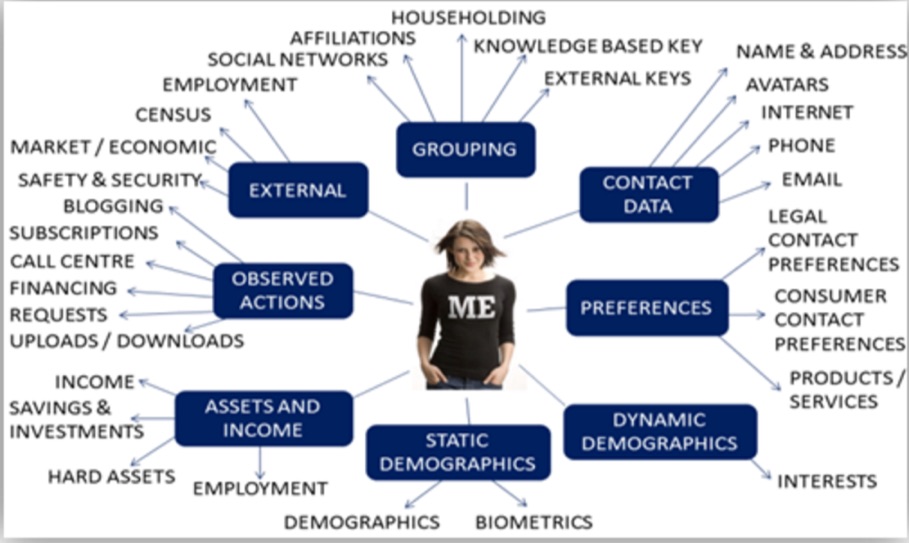

customer-demographics-chart


“Understanding who your customers are and, in turn, what they like, will undoubtedly enable you to increase conversions and sales. Make it easy for your customers to share their data with you, and use that data to keep them engaged with your business,” says Josh George, a senior applications engineer at Lyons Consulting Group.


Know who you're serving. Collect valid data for better results.


Enhancing Buyer Personas


Get inside your prospects' minds. Map out your ideal customer to understand their reasons for buying.


But, what's the point?


Buyer personas are roadmaps to navigating through your prospects' interests, dislikes, and habits. If you're aware of their behaviors, your team can create targeted solutions.


“By developing research-based buyer personas, you can create effective, highly targeted marketing campaigns. Each piece of communication ties back to your buyer personas so that every message addresses relevant pain points and positions your software as a viable solution,” states Brie Rangel, Account Strategist at IMPACT.


Knowing the basic demographics of your buyer is a given. Your team's goal is to dive deeper. Learn your customers' goals, challenges, and personal story.


Below is an example of a buyer persona for a specific startup founder. The story section offers a complete picture of the prospect, everything from the stage of his product to what he does for fun.


buyer-persona-startup-founder


The role of customer data is to provide accurate information for your buyer personas. You don't want to waste time selling enterprise-level B2B SaaS software to a B2C startup.


Moreover, inaccurate buyer preferences and habits will leave both the prospect and sales rep frustrated. So, double-check your personas.

Because in the end, your mission is to match your product with a qualified lead. That's how you bring in sales.


“Use personas to spend more time with qualified leads, because they're the ones who are most likely to turn into those long-term customers you're looking for,” says Nicole Dieker, freelance writer and copywriter.


Enhance your buyer personas. Use data to add a face to the customer.


Segmenting Your Audience


After learning your customers distinct behaviors, it's time to serve those individual needs.

It makes no sense to group everyone together.


If Sally specifically likes apples, why send her emails about oranges and grapefruits? Instead, educate her about the difference between gala apples and pink lady apples.


That's a mental hurdle for most SaaS teams. We assume if our customers like X; they will definitely love Y. It isn't always that simple.


Segmentation comes in many shapes and sizes. From geographical to behavioral differences, your customers vary. And it's up to your team to discover how to connect with them.
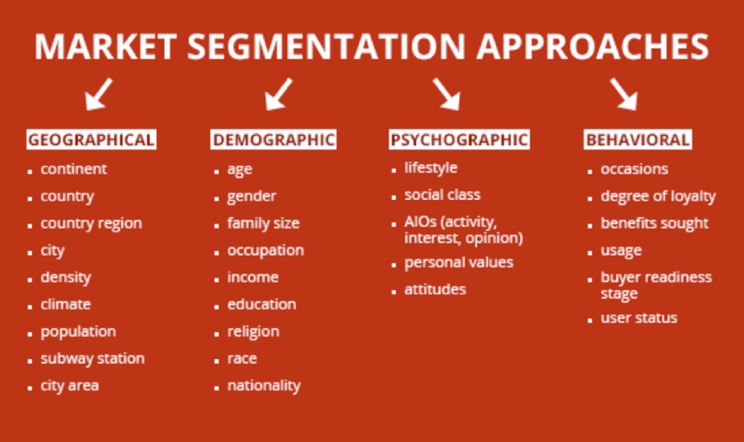

market-segmentation-approaches


You might consider a city in a particular state or the buyer's readiness to purchase. Work with your team to develop a goal.


Define your reason for segmentation. Experienced marketing and product leader Doug Goldstein offers the following common segmentation objectives:


  • Create segmented ads & marketing communications

  • Develop differentiated customer servicing & retention strategies

  • Target prospects with the greatest profit potential

  • Optimize your sales-channel mix


Segmentation is impossible without customer data. Add insights derived from analytics to guide how you group prospects.


And don't be afraid to experiment. Testing is how you'll discover the right messaging for your sales reps. Plus, it can help you market product information on your site.


“When practicing website optimization, leveraging customer segmentation provides a framework for running intentional, well-hypothesized experiments on your website that drive value,” writes Junan Pang, a solutions architect at Optimizely.


Segment your audience to deliver more personalized and timely experiences. With a segmented list, you'll be able to target the right services to interested buyers.


Building The Relationship


You can collect the data, create the buyer personas, and segment your audience. But all that data can't substitute customer relationships.


And that's where most businesses miss their opportunity.


“[C]ompanies often manage relationships haphazardly and unprofitably, committing blunders that undermine their connections with customers,” states Jill Avery, a senior lecturer at Harvard Business School.


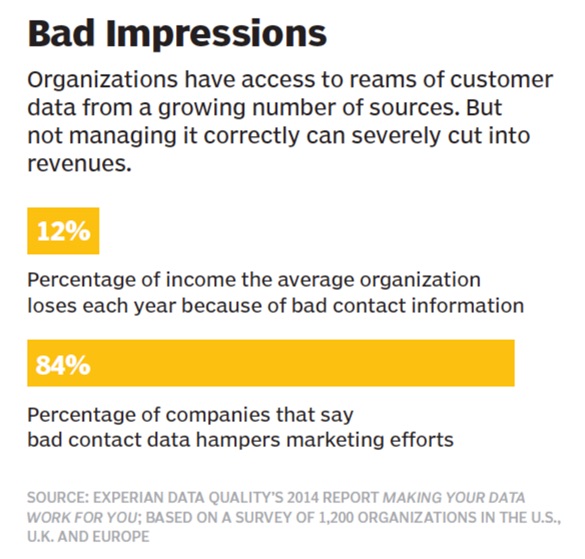
Customer data is intended to facilitate the relationship between the sales rep and the buyer. However, research shows that companies without sophisticated data management tools “derive erroneous results that annoy customers, resulting in a 25 percent reduction in potential revenue gains.”

bad-impressions


Don't attempt to foster a customer relationship with poor-quality data. If you do, prospects will seek out your competitors.


TechTarget executive editor Lauren Horwitz and SearchCRM site editor Tim Ehrens agree:


“Customer data management often falls to the bottom of the priority list. Organizations get bogged down with more pressing issues, such as cutting costs or keeping daily operations running. But relying on poor-quality customer data almost always frustrates customers - and many of them take their business elsewhere.”


Relationships are built on human-to-human contact. That means being genuinely interested in your buyer's concerns.


How can you make their lives better? Where can you offer convenience?


And sometimes your product won't be the solution. Yes, your SaaS service may not be the best option for that particular person.


Sales teams must recognize that it's okay to remove unqualified prospects from the pipeline. This action should be commended, not frowned upon.


Use customer data as a tool to score leads. Then, gain insight on how to target prospects that matter to your company.


Data shouldn't supplant the customer relationship. Make the human connection.


Go for the Data


Your team needs qualified leads. Focus on customer data as a solution.


Gather data from reliable sources. Use buyer personas to target your audience. Segment their behavior to create a personalized approach. And focus on building relationships throughout the sales cycle.


Want more leads? Go for the data.


About the Author: Shayla Price lives at the intersection of digital marketing, technology and social responsibility. Connect with her on Twitter @shaylaprice.


SearchCap: AdWords reports, CTR data & Google Maps ads

Below is what happened in search today, as reported on Search Engine Land and from other places across the web.

The post SearchCap: AdWords reports, CTR data & Google Maps ads appeared first on Search Engine Land.


Please visit Search Engine Land for the full article.


Europeans Using Solar Power To Transform Urine Into Beer


style="display:inline-block;width:250px;height:250px"
data-ad-client="ca-pub-7815236958543991"
data-ad-slot="8717335615">


For the second year in a row, a team of researchers at Belgium's Ghent University is collecting urine at one of Europe's largest festivals, Roskilde. The researchers are hoping that by the time next year's festival rolls around, one of the country's breweries should have plenty of recycled urine beer to pour out for adventurous drinkers. The first time around, researchers say the goal was to extract nutrients that could be used as fertilizer. According to an article last summer, more than 25,000 liters of urine were collected and the fertilizer that was produced from it provided nourishment to a barley crop. This year, the researchers were after another critical beer ingredient: water.


Here's How to Use Your Daily Habits For Writing Better Content In Less Time

Posted by Lesley_Vos

I write every day for my blog as well as other publications. I'm a big fan of guest posting, and every day I do everything I can to reinforce better writing.

The problem: Content creation is time-consuming:

  • Content marketers deal with multiple tasks: social media content (93%), newsletters (81%), articles for websites (79%), blogs (81%), in-person events (81%) and more.

  • Lack of time is one of top 5 challenges for 51% of content marketers while 50% face the challenge of producing truly engaging content.

As a result, we have to find and apply different tactics to become more productive and efficient, as well as optimize our work to achieve better results.

Yes, creating content is hard work. Every time I read works of Neil Patel, Rand Fishkin, or Jon Morrow, I wonder, "How do they write so many articles every week together with dozens of other tasks to complete?"

Do they "work 80-hour weeks?" Do they have an "army of assistants?"

It seems Neil Patel somehow heard my silent moanings when he wrote How to Write 5 or More Articles a Week and Not Burn Out, explaining the best tactics available for content marketers anytime and anywhere.

His article made me think of using alternative habits for writing more content in less time.

Famous writers didn't hesitate to use their weird habits for more efficient work. So, maybe it makes sense to follow their lead and find benefits in our love for coffee and music for better content writing?

So, I've taken my daily habits and decided to learn how to develop them for writing better content in less time.

1.jpg

#1 - Read the news

I can't help reading the news online. Turns out, this daily habit holds benefits for content writers:

  • It improves writing skills, encouraging better cognitive skills and brain functioning. Plus, it enriches vocabulary.

  • It provides ideas for new content.

  • It lets them learn from professionals and follow their steps.

To make this work, avoid reading everyone and everything. Make a list of channels and resources that inspire you as well as educate you.

Learning from experience, I can say Moz, Copyblogger, QuickSprout, and Smart Blogger are the best helpers in my niche. Rand Fishkin and Neil Patel teach me all the aspects of and latest trends in content and Internet marketing, while Brian Clark and Jon Morrow demonstrate the art of writing and encourage me to polish up my writing skills.

And applications such as Digg or Newsbeat have helped me organize a newsfeed the way I could take the most out of my reading habit.

#2 - Free writing

If your daily habit is getting up early, your free writing are ripe for development.

It's a writing technique described by Julia Cameron and Mark Levy as a way to free the subconsciousness by telling all your worries to a piece of paper. All you need to do is start every day with writing three pages of text.

The topic doesn't matter. Just sit and write.

When developed, the habit of free writing can be a big help, including providing topics for new content and allowing you to create drafts quickly.

To develop this habit and use it for content creation, you should do nothing but write three pages of text every morning. Don't try too hard. Simply allow your thoughts to flow, write quickly, and set some time limits.

I dared to try it after I had read Julia Cameron's The Artist's Way. While I'm a night owl, and it's an act of bravery for me to wake up early, I was faithful in writing three pages of text every morning and even discovered the site 750 Words. Working and spending 8–10 hours at a computer regardless the day of a week, I supposed it would be easier for me to free write online.

The most helpful thing about this website was its analytics and charts about every piece I wrote:

750words_screenshot.png

It let me analyze my writing and see what I needed to change for faster and more accurate work: I decreased the number of distractions and the level of wateriness in my writings (the tool showed which words I used the most).

My final attempt to fall in love with free writing was a master class by one local artist. Armed with a pen, a notebook, and cappuccino, I was in a good mind to give free writing a chance...

She gave us three tasks:

  • "You have 5 minutes. Write about the latest problem that worried you and how you solved it." It helped me realize what a slow writer I was. Five minutes were not enough for me to describe the problem, much less speak of the solution.

  • "You have 10 minutes and three topics. Choose one and write about it." Mine was to take a phrase and begin a story with it. It taught me to start writings with a hook, as it saved time and made me write faster.

  • "You have 15 minutes. Make a to-do list for 2016." The trick was to write 100 items and avoid mentioning the same deed twice. It taught me to concentrate on the train of my thoughts to avoid wateriness and save time for editing my writing afterward.

Now I use free writing when I need to come up with writing ideas. It saves time for brainstorming, and every free writing session gives me 2–3 ideas for future articles. Plus, I write faster now. (Yes, time frames matter.)

The moral of this story: free writing is a daily habit worth developing. Don't give up. Just write.

The technique is a big hit today, and many tools have been developed to use it with comfort. Try 750 Words, Write or Die, or Written? Kitten!

2.gif

#3 - Drinking coffee

A daily habit of drinking coffee has its scientifically proven benefits, too:

  • Coffee stimulates productivity.

  • Coffee helps to stay more alert.

  • Coffee increases creativity and mood.

I'm a coffee addict, so I can say with full confidence that it helps with my content marketing endeavors. The trick is to know when and how much coffee to drink for better writing.

I drink two cups per day.

Although the perfect time is between 10 a.m. and noon, and between 2 p.m. and 5 p.m., I take my first americano with milk on early mornings. It stimulates my workflow, as well as gets me into the swing of writing.

My second cup comes between 3 p.m. and 4 p.m. It works like a charging system to revive spirits and, therefore, support a sufficient level of productivity in the afternoon. After my second cup of coffee, I have the energy to research and write outlines for my content.

#4 - Plan everything in advance

Does it make your friends smile? Mine still don't understand why I want to be ahead of the game and plan everything two or three months before deadlines.

Want to know the best part? This habit is my savior:

  • It leads to better and more organized research.

  • It sets time limits, stimulating you to write faster.

  • It lets you create content plans and schedule like a boss.

With that in mind, I've chosen Trello to make this habit of planning flourish. My favorite thing about this tool is its keyboard shortcuts that allow me to manage tasks with one click. Plus, I use its Google Drive integration and desktop notifications to share and edit content quickly, as well as remember about all deadlines for planning my time properly.

Besides Trello, Asana, Evernote, or Wunderlist are worth exploring as well.

#5 - Listening to music

This one is my favorite.

Working in the open-plan office with 14 people, half of whom regularly practice idle chitchat, I've found the perfect escape from frustration and, therefore, procrastination: music.

Music helps me concentrate on work, lowers my frustration, helps me write letter-perfect text, and speeds up my writing.

Listening to music in the office has also helped my writing accuracy.

3.png

Image via Music Works For You infographic

Following the advice from Neil Patel on "youifying" content (I love that word), I use music to cheer up, gain inspiration, awaken creativity, and put me back on a productive track while writing my articles.

Listening to music also helps me save writing time:

  • It signals to others that they shouldn't interrupt you. (Headphones work perfect for me!)

  • It stimulates thinking.

  • It makes writing more enjoyable. (Thank you, Karl Frierson!)

  • It raises efficiency. (Jazz is my #1 choice here.)

Numerous studies confirm music's positive influence on productivity and efficiency at work. University of Birmingham, England shares that music makes repetitive work more enjoyable. And according to researchers from Rensselaer Polytechnic Institute, music boosts moods and helps us focus.

(HubSpot shared six science-based playlists to choose for listening at work.)

But when it comes to tasks requiring more brainpower, sounds of nature, songs without lyrics or classical music seem to have the best impact on our productivity.

Are there any daily habits you use for writing content and organizing your time for better productivity? How do they work for you?


Sign up for The Moz Top 10, a semimonthly mailer updating you on the top ten hottest pieces of SEO news, tips, and rad links uncovered by the Moz team. Think of it as your exclusive digest of stuff you don't have time to hunt down but want to read!

Thursday, July 28, 2016

9 Ways For Marketers To Do Amazing Technical Things Without Knowing Code

As a marketer, you are always looking to do more with less. You may get the sense that technology can help you do better and you're right. Follow along as I explain exactly how you can harness this force without writing a single line of code.


1. Do A/B Split Tests and Personalization You've probably heard of all the merits of A/B split testing and of being data-driven, but how can you implement these different tests on each of your pages without consulting the tech team?

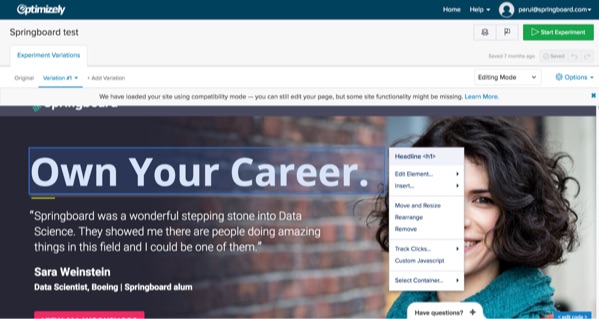
It's easy enough with solutions like Visual Website Optimizer and Optimizely that allow you to drag and drop your changes across the website by simply copy and pasting a snippet of code across your website (or getting somebody technical to help you do that). Both tools allow you to customize your website for different types of visitors, and they'll allow you to run controlled experiments to see which variations of your web pages perform best.


optimizely-set-up-experiment
Optimizely allows you to drag and drop different variations of your web page without any code.


2. Build Landing Pages


Maybe you don't want to optimize your website – you want to build some new pages. Maybe it's a new campaign announcing a new product launch, or maybe you're running an event you want to collect an email waiting list for. Whatever it is, you'll need a web page that describes what you're doing, a landing page. Thankfully, you don't have to build anything in HTML or CSS. You can use drag and drop editors in Unbounce or, if you're really looking to maximize conversion, marketing-based solutions like Leadpages.


3. Build Entire Websites


Don't want to stop at just building a web page? Maybe you want to look to build an entire website for a new product. Thankfully, you don't have to call a web agency to do everything for you at a high price! You can use solutions like Squarespace or Wix to build everything in your website without a line of code. And if you want to get even more customized, grab a theme from Themeforest and learn the basics of WordPress! You'll soon be building beautiful websites with layers of personalized complexity–without a line of code.


4. Scrape Links, Content and More with Python (but use with caution!)


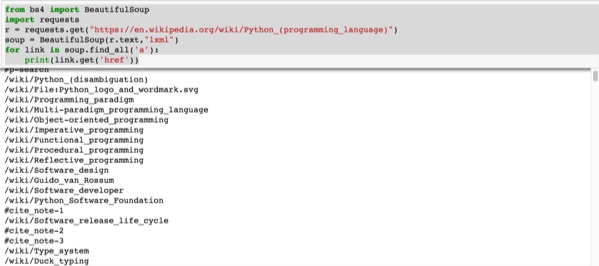
By downloading Anaconda and using the iPython Notebook contained within, you can use Python scripts and copy + paste the outputs.


The easiest and most powerful use of this is to take links and data from other websites. Be careful though, a lot of websites will have terms of use that prohibit the use of their content. Nevertheless, it might be a good tool to use to get raw data, or to get useful links that point to certain resources. You might, for example, want to get all of the links of your competitors profiled in a certain blog post, or you might want to get all of the links of different services in a directory.


anaconda-python-code


This script above will take all the links from a sample page (in this case the Wikipedia page for the Python language)


Here's the raw script you can copy + paste in Python 3.5 mode:


from bs4 import BeautifulSoup

import requests

r = requests.get(“https://en.wikipedia.org/wiki/Python_(programming_language)”)

soup = BeautifulSoup(r.text,”lxml”)

for link in soup.find_all('a'):

print(link.get('href'))


5. Send Newsletters and Automate Emails


Email is one of the most effective marketing channels out there, and the best for return on investment. If you can get people coming back by filling their inbox with valuable information, you've reached marketing nirvana.


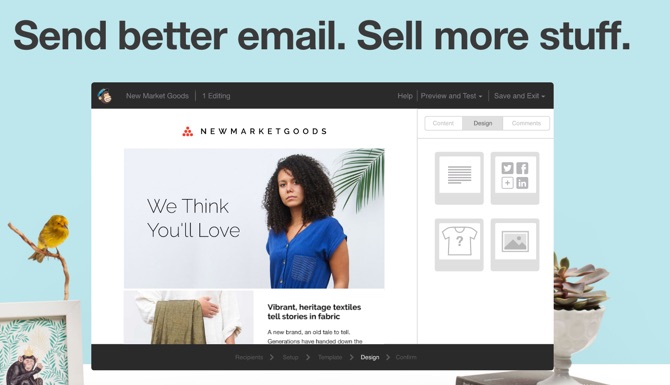
mailchimp-sell-more-stuff


Instead of doing all the messy work coding up HTML-rich emails, you can use the drag & drop and email list capabilities of MailChimp. If you want to automate emails a layer beyond, and take people through an in-depth series of automated emails, you could use a solution like Drip.


6. Get Data


Ever needed to take a quick look at certain data, like the demographic traits of a certain country? Need to source the latest financial data? Look no further than Quandl. You'll be able to find all sorts of data, from the average age of first marriage for women to life expectancy at birth. Best of all, you can export that data directly in Excel, stepping away from all of the code if you needed.


7. Filter Through Data


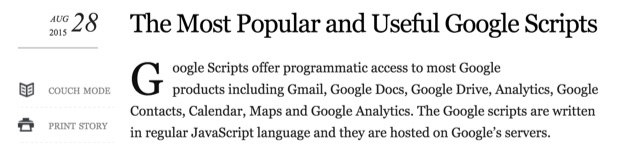
Most people think of Google Apps as a great way to collaborate with others, but they don't know about the full power of this suite of tools. Google built a way for you to add layers of functionality on top of their powerful software, allowing you to do so much more with different types of data. Best of all, you can copy + paste pre-made scripts and benefit from the effects without being technical!


Check to see if your website is online or save all tweets that match a certain hashtag to a spreadsheet. You can do that or a variety of other tasks through scripts that will save you time and money.


most-popular-useful-scripts


Use these scripts for good, not evil.


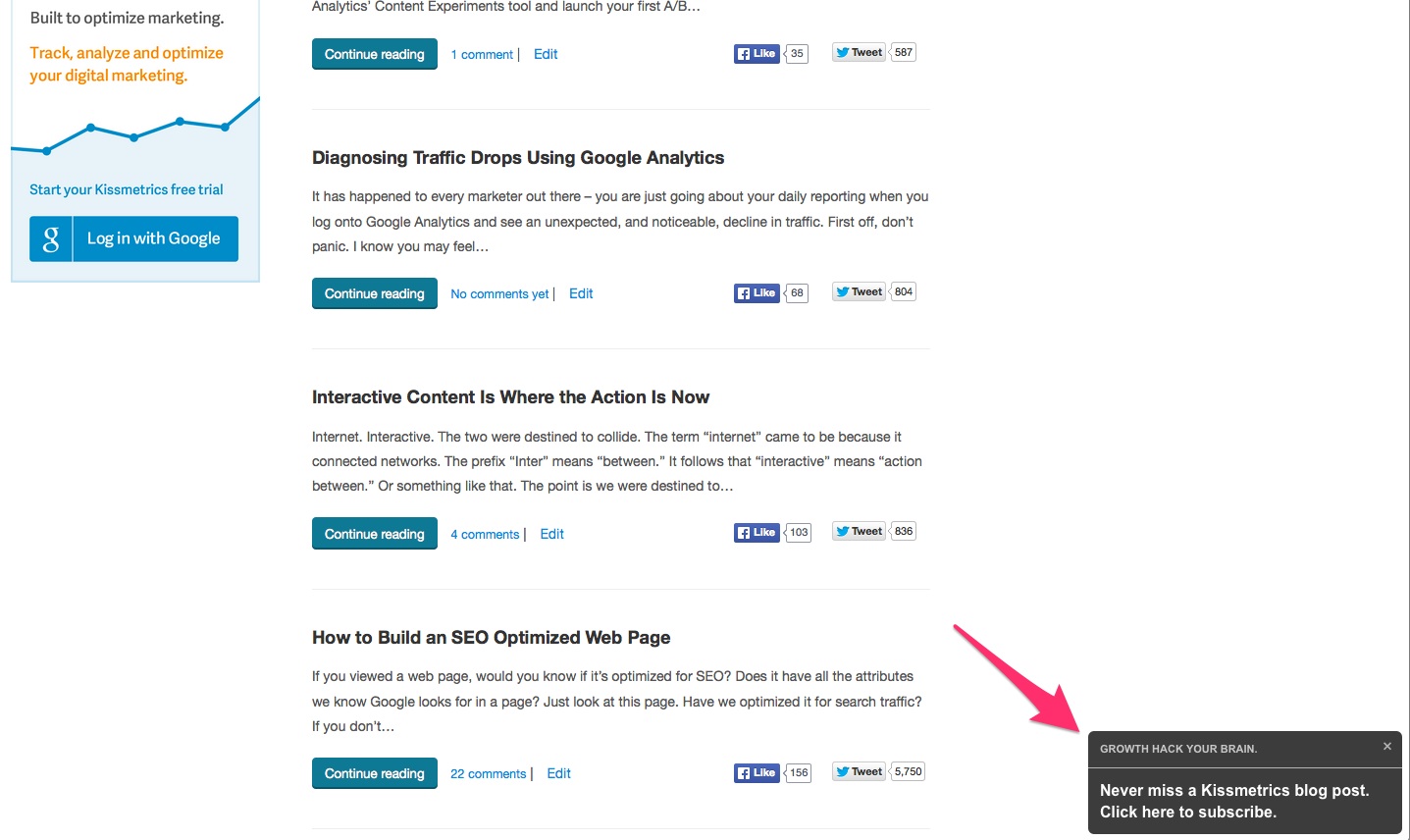
8. Building Popups and Other Interactive Elements on a Website


Sometimes, you want to add an additional layer of interactivity to a website, whether it's a popup to highlight a brand new feature, or a walkthrough that will help guide users. Thankfully, with tools like Engage and HelloBar you can add different modals or elements to your website that can help you collect emails, direct traffic elsewhere, or dictate what users should look at in a web page.


kissmetrics-engage-lightbox-on-kissmetrics-blog


9. Dig Deeper into Websites, and See How Your Website Looks in mobile


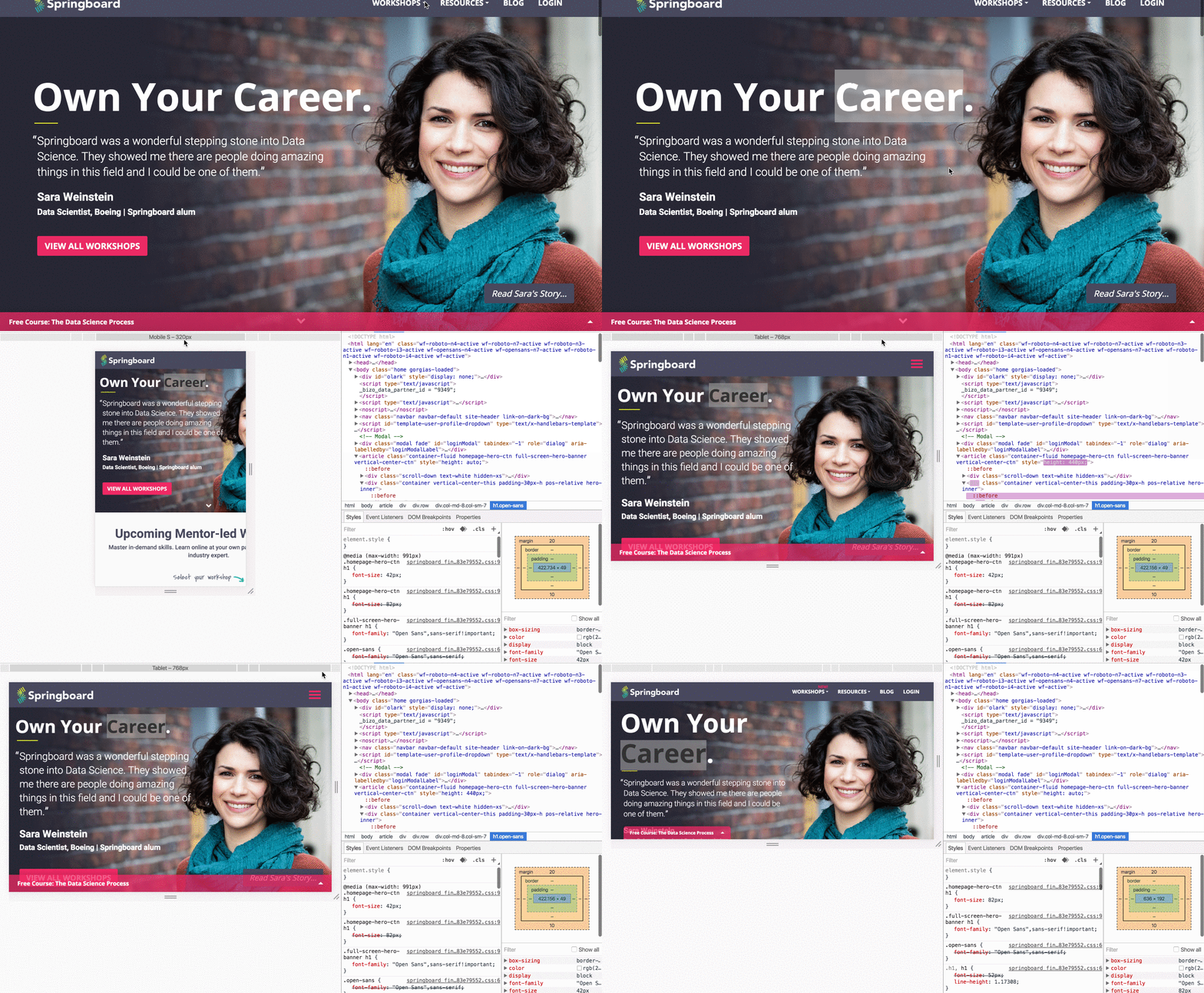
Most people don't know about the handy Google Chrome Inspector or its equivalent Firebug on Firefox. While most of the time it is used by developers to spot errors or mock up certain changes in the code, you can use the Inspector to check into the exact URLs of images, and how your website displays on different screen sizes, from iPhones to tablets.


responsive-design-chrome-inspector


The responsive design tool in these inspector tools will allow you to simulate what your website looks like from device-to-device, a crucial need to see if your website is mobile-friendly. This is a factor that's critically important for websites with mobile traffic, and one that Google uses to rank webpages.


Conclusion


By harnessing technology, you'll be at the cutting-edge of digital marketing. You won't even need to learn how to code to get an awesome array of new powers. Save yourself time and money, and make sure you use your new capabilities for good!


About the Author: Roger is a digital marketer who self-taught himself to code but recognizes when code is useful and when it isn't. He manages Growth for edtech company Springboard, and will often write about new technologies at his own personal blog code(love). You can find him on Twitter.


Here's How to Cut Your MozCon Travel Costs by Half

Posted by BeardedMarketer

57981c9498b818.21917298.jpg

Marta Turek speaking at Mozcon 2015

When it comes to digital marketing conferences, the choices are overwhelming.

From Minnesota to Austin, Seattle, Miami, New York, Los Angeles, Europe, and Asia, there seems to be an event nearly every week of the year.

To me, one conference stands out as not your typical marketing conference: MozCon.

Every July, for three days, 1,500 people from across the globe descend upon Seattle for the event.

When I speak with colleagues, I hear over and over how they avoid attending conferences in general because of the cost. From conference ticket to airfare to hotel accommodations, the expenses can add up quick. And if you're a small agency owner (like me), a freelancer, or just a dedicated digital marketer footing their own bill, every expenditure matters and resources are eternally limited - myself included.

So after attending MozCon 2014 and spending more than $3,000, including the event ticket, I figured there had to be a better way.

And there is...

In the last two years I've been able to dramatically trim the cost of attending MozCon, and most of the tactics I use can be used for any event.

Small steps, big savings

Event tickets: One of the biggest expenses for attending conferences is the event ticket. Simply put, there is no replacement for early planning. Whether it's MozCon, ComicCon, or a Beyoncé concert, early-bird pricing is typically available and can result in substantial savings.

For MozCon, specifically, the biggest savings can be had by taking advantage of super early bird pricing: $599; early bird pricing: $799; or becoming a Moz Pro Subscriber: $999.

Bottom line, book early.

Lodging: Seattle is an expensive city to travel to. While the public transportation makes getting around a breeze, finding a hotel to rest your head on for a reasonable rate can be a seemingly insurmountable task.

There are other options.

In the last 18 months, I've become the biggest fanboy for Airbnb. With a little bit of research and due diligence, you can find a shared room, a private room, or in my case an entire home to rent, and (surprisingly enough) at rates far more affordable than a hotel room.

I'll break down my exact costs for the trip below, but I was able to secure an Airbnb just a few miles from the convention center for significantly less per night than the cost of the host hotels. Additionally, when I factoring in the cost of catching an Uber each morning and afternoon, I was still spending far less per day than had I stayed at one of the host hotels.

Want to lower your housing costs even further? Find a two or three bedroom Airbnb and split it with 1–2 roommates, which is exactly what I did. (Check the Capitol Hill, First Hill, Squire Park, & Hilltop neighborhoods, which are all fairly close and offer lots of options.)

Airfare: I'm not going to pretend for a second that I'm some sort of amazing travel agent or have some sweet algorithm that helps me get the lowest airfare prices and deals. But I am smart enough to know that, like conference ticket prices, it pays to get airfare well in advance.

Quick life hack: Google's flight booking system is awesome in the fact that it will show you the cost of flying in/out at multiple dates/times so you can save yourself significant money by flying out at a less desirable time, like 7:30am on a Sunday morning like I did.

If you have flexibility, traveling during some "off" hours can pay huge dividends in flight savings.

How much money I saved (and you can, too)

Here's (my first) 2014 MozCon travel expenses:

  • Conference Ticket: $1,000 (Eds. note: $999)

  • Hotel: $1,500

  • Airfare: $500

  • Total: $3,000

For comparison sakes, here's the 2015 travel expenses:

  • Conference Ticket: $800 (Eds. note: $799)

  • Airbnb: $400 (my share)

  • Airfare: $320

  • Total: $1,520

Expenses for 2016, so far:

  • Conference Ticket: $599

  • Airbnb: $642 (Sunday–Thursday)

  • Airfare: $260

  • Total: $1,502

And if you're asking me, having an apartment/house is a huge upgrade compared to any standard hotel room. Add in the fact that our Airbnb has a rooftop deck and balconies off every bedroom and the living room, and it's nearly incomprehensible to me why anyone would stay in a hotel room.

Best part, I just booked my Airbnb and flights last week, which means there's still one to two weeks to take advantage of the timing window and reap significant savings.

Another resource worth perusing: The Positive ROI of Conferences: A Deep Look at #MozCon

Get in your boss's ear

Want to win your bosses appreciation? Come to her with the cost breakdown similar to what I highlight above, and you're sure to have helped your cause. I bet your pitch on attending MozCon, or whatever event you endeavor to attend, converts a little better.

Find me at the MozCrawl, Ignite, or the Garage Party, because every dollar saved is one more dollar for cocktails.

Care to share any ideas you have for saving money when traveling to events?


Sign up for The Moz Top 10, a semimonthly mailer updating you on the top ten hottest pieces of SEO news, tips, and rad links uncovered by the Moz team. Think of it as your exclusive digest of stuff you don't have time to hunt down but want to read!

Wednesday, July 27, 2016

Google iOS app gets better listening skills for voice searches & newly added features

Hotel search results will now show expanded information around hotel amenities and gas station searches will include gas prices.

The post Google iOS app gets better listening skills for voice searches & newly added features appeared first on Search Engine Land.


Please visit Search Engine Land for the full article.


SearchCap: Google political bug, Google PageRank redirects & more

Below is what happened in search today, as reported on Search Engine Land and from other places across the web.

The post SearchCap: Google political bug, Google PageRank redirects & more appeared first on Search Engine Land.


Please visit Search Engine Land for the full article.